


Fender Guitar Tuner
4.69.96K Reviews
App Specs
- Version
- 4.15.8
- Updated On
- License
- Free
- Downloads
- 5,000,000+
- Developer
- Fender Musical Instruments Corporation
- Categories
- Music & Audio
- Platform
- Android, iOS
Screenshots
 Analysis by AppCompare
I judge a tuner by what happens when I’m holding an instrument, ready to play, and don’t want a setup puzzle first. Fender Guitar Tuner is a music app from Fender Musical Instruments Corporation, aimed at guitar, bass and ukulele players. It costs nothing to download, and its uncluttered approach makes it an appealing starting point if you want tuning and a metronome together rather than a collection of music tools to learn.
Where tuning can go wrong
The first hurdle with any phone tuner is not usually the display; it is getting a clean note for the microphone to recognize. A noisy room, other players warming up, or a string still ringing from the previous adjustment can make the reading jump around. I get better results by muting the strings I am not checking, plucking one string gently, then letting its pitch settle before I turn the peg. That small pause is more useful than chasing every flicker of the indicator.
It also helps to tune in a consistent order. I work across the strings rather than repeatedly revisiting whichever one looks least settled, then make one final pass. Changing one string can slightly affect the others, especially if the instrument has just been restrung or has been sitting unused. This is not a flaw unique to a phone app; it is a normal part of tuning. The practical benefit here is having a clear visual reference available while I do those checks.
If the needle seems uncertain, I first move away from nearby conversation, a television, or another instrument. I also avoid plucking hard: a forceful attack can make a note sound momentarily sharper before it settles. A tuner can only interpret the sound reaching the phone, so a clean, separate note gives it a fairer test. These habits make the tool feel calmer and keep me from turning a tuning peg too far in response to a brief movement.
Simple checks before a session
Before relying on the app for a rehearsal, I check the basics: the phone has enough battery, the instrument is audible in the room, and the microphone opening is not covered by my hand or a case. If the app does not seem to react, I close other sources of noise and pluck one string again. If it still does not respond as expected, I check that the app can use the microphone in the phone’s system settings. Those are sensible first steps for a tuner that listens through a phone; they do not require changing the instrument or repeatedly reinstalling the app.
For a quick tune-up, I keep the phone on a stable surface close enough to hear the strings, rather than holding it in the same hand that is turning a tuning key. That leaves both hands free and makes it easier to compare the reading from one pluck to the next. In a crowded room, I may step into a quieter corner for a minute. A compact tuner is convenient, but it cannot isolate the instrument from sound around it as well as a clip-on device attached directly to the instrument.
The app’s stated minimum operating system is version 11. It is worth checking that before planning to use an older device as a dedicated practice tuner. The app is rated for Everyone, and it has reached over five million installs, with an average rating of 4.6 from around sixty-nine thousand ratings. Those figures suggest that it is widely used, but they do not guarantee that every phone or room will produce the same tuning experience.
Worth Reading Before You Choose

Flipboard Shows What News Apps Must Do Beyond the Feed

Switching to Android Auto Means Rethinking Your Driving Routine

Google Calendar Makes a Crowded Week Easier to Manage

Ludo King Makes the Most of the Minutes Between Plans

Baby Panda World Brings Quick Play to Modern Phones, but Its Game Library Feels Busy

ESPN’s Live Game View Makes Following Close Games Easier
Recovering a useful workflow
One helpful way to avoid confusion is to decide on the tuning before touching the pegs. If I am switching from standard tuning to a song-specific setup, I identify that target first and then tune each string deliberately. Fender Guitar Tuner is described as supporting alternate tunings, and that can save a separate search when I need a familiar setup such as drop D. I still make a habit of checking the instrument’s current tuning before changing anything, because a wrong starting assumption can send a perfectly good string in the wrong direction.
The built-in tone generator offers a different workflow from watching the needle. I can use a reference tone and tune by ear, which is useful when I want to practise hearing whether a string is high or low rather than relying entirely on a visual cue. It is not automatically the easiest route for a beginner, and I would not treat it as a shortcut if I am unsure what pitch I should be matching. Used patiently, though, it turns a quick setup step into a small listening exercise.
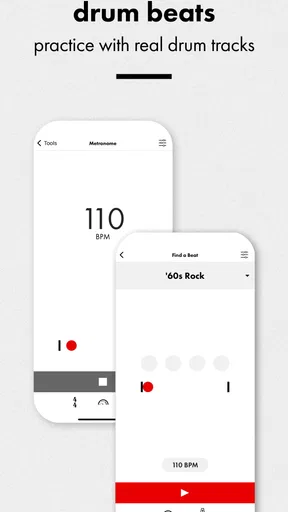
The metronome is handy when the session moves straight from tuning into practice. I can set a tempo and work on a passage without opening another app or looking for a separate device. For rhythm practice, I prefer starting at a pace where I can play cleanly, then increasing it only after the part feels secure. A metronome will keep time, but it will not tell me whether my phrasing is musical or whether I am tensing up; I still need to listen to the playing, not just the beat.
A realistic use case is a short practice session after work: I take the guitar out, check the strings in a quiet room, select the tuning I need, and use the metronome for a few focused minutes on a difficult change. Keeping tuning and timing in one place removes a little friction, especially when I do not want to set up a full pedalboard or search for a hardware tuner. If I am rehearsing with a band, I would tune before the room gets loud and then verify again in a quieter moment if the instrument has shifted.
When the app is not the cause
A stubborn reading does not always mean the tuner is inaccurate. Old strings, a slipping tuning peg, a string binding at the nut, or an instrument that has not settled after a change can all make pitch unstable. I look for a repeatable reading after a gentle pluck rather than blaming the app for every wavering note. If one string keeps drifting while the others behave normally, checking the instrument’s hardware and string condition is more productive than swapping between several tuner apps.
Phone tuners and clip-on tuners have different strengths. A phone is convenient when I already have it nearby and want tuning plus a metronome without carrying another accessory. A clip-on tuner is often the more dependable choice on a noisy stage because it senses vibration at the instrument instead of depending on the sound reaching a phone microphone. A pedal tuner may suit a guitarist who wants a dedicated device integrated into a performance setup. I would choose among them based on where I play, not on the assumption that one format is best for every situation.
There is also a trade-off between a simple tuner and a broader music-practice app. If my only goal is a fast visual check, a basic tuner can be enough. If I want an all-in-one practice space, the metronome and tone generator make Fender’s option more useful than a tuner that only displays pitch. On the other hand, players who need stage-focused controls, a physical mute switch, or a device that works independently of a phone may be happier with hardware. The app’s appeal is convenience, not replacing every tool in a musician’s case.
The current version is 4.15.7. As with any app, I would keep it updated through the normal app-store process and check whether the phone itself remains compatible before depending on it for a session. Fender Guitar Tuner was released on January 25, 2017, and has accumulated around 9,800 written reviews. The overall response is encouraging, though individual results still depend on microphone performance, surroundings, instrument condition, and the player’s tuning habits.
First Impressions
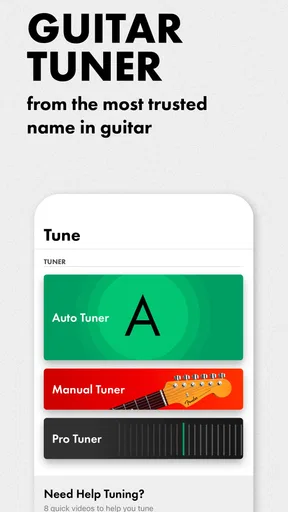
Right off the bat, the Fender Guitar Tuner app has a super clean and user-friendly interface. You know how some apps make you feel like you need a degree just to navigate them? Not this one. It’s straightforward, which is great because who has time to fiddle around with complicated settings when you just want to tune your guitar and start jamming?
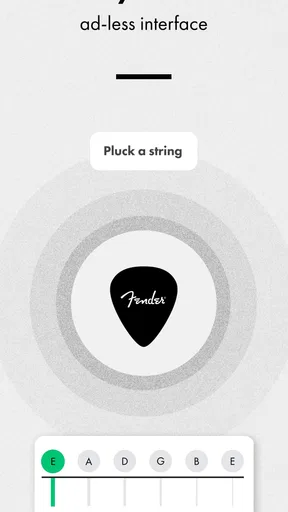
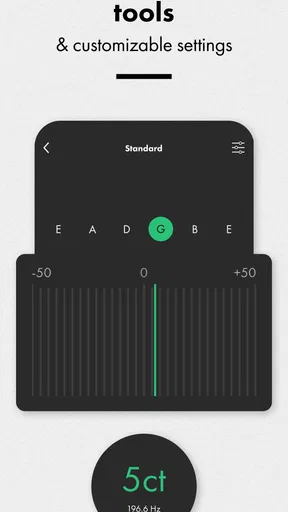
The app opens up to a simple tuner screen that displays a needle indicator to show you if your string is too flat or sharp. Perfect for quickly getting your guitar in tune. Plus, the app supports a variety of tunings, so whether you’re going for standard or something more exotic, you’re covered.
Features That Stand Out
One of the features that really caught my attention is the app’s ability to recognize alternate tunings. Whether you’re into drop D, open G, or any other non-standard tuning, this app has got your back. It’s like having a personal guitar tech in your pocket.
Another cool feature is the built-in metronome. Any musician knows the importance of timing, and with this app, you don’t need a separate device to keep you on beat. The metronome is easy to use, and you can adjust the tempo with just a few taps.
Now, if you’re someone who loves to practice and track progress, you’ll appreciate the app’s ability to save your tuning history. It’s a small feature, but it’s handy for those times when you want to quickly switch back to a previous tuning.
Using the App
Using the app is as easy as pie. Simply open it up, pluck a string on your guitar, and watch the needle move. The app provides immediate feedback, which is great for making quick adjustments. It also has a built-in tone generator if you prefer tuning by ear, which can be a great ear training exercise.
The app’s accuracy is top-notch. I tested it against a physical tuner, and the results were spot on. This level of precision is what you’d expect from a brand like Fender, and they definitely deliver.
Why You Should Consider It
If you’re still not convinced, let me say this: having a reliable tuner is essential for any guitarist, and the Fender Guitar Tuner app provides that reliability with a host of additional features. It’s perfect for practice sessions, live performances, and everything in between. Plus, it’s free to download, which is always a nice bonus.
Overall, I’d highly recommend giving this app a try. Whether you’re just starting out or you’ve been playing for years, it’s a tool that will enhance your playing experience. And who knows, it might just become your go-to app for all things guitar tuning.
In conclusion, the Fender Guitar Tuner app is a worthy addition to any guitarist’s toolkit. It combines functionality with ease of use, making it a fantastic choice for anyone looking to keep their guitar sounding its best. So go ahead, download it, and get ready to rock!
Who will get the most from it
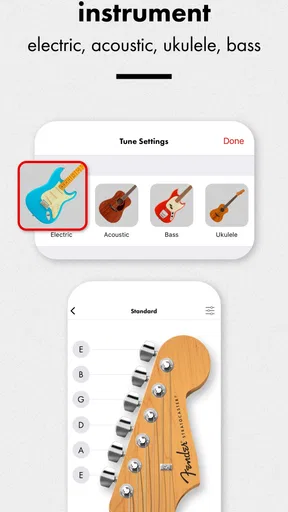
I think this is especially well suited to beginners who want a clear visual guide without buying a separate tuner immediately, and to casual players who keep their phone nearby during practice. Bassists and ukulele players may also find the app relevant, since it is intended for those instruments as well as guitar. The main advantage is having a few practical jobs—checking pitch, hearing a reference tone, and keeping time—available in one familiar place.
It is less compelling for someone who already owns a reliable clip-on or pedal tuner and needs no extra practice tools. I would also hesitate to make a phone-based tuner my only option for a loud stage, an outdoor session with wind and traffic, or a rehearsal where several instruments are sounding at once. In those settings, a dedicated hardware tuner is a sensible backup, not an unnecessary luxury.
A few habits that make it easier
When I am tuning by ear, I use the tone generator as a reference rather than letting it turn the task into a guessing game. I match one string carefully, then move through the rest in a deliberate order. If my ear is tired or the room is noisy, I switch back to the visual needle instead of forcing the exercise. The useful choice is not “visual versus ear” as a matter of principle; it is using the method that gives a stable result in that moment.
I also avoid making several large peg adjustments after a single reading. A gentle pluck, a moment for the note to settle, and a small correction make the process easier to judge. After tuning all the strings, a second pass is worthwhile, especially if I have changed to an alternate tuning. This workflow takes little extra time and reduces the chance that I mistake a string’s settling for a problem with the app.
For a practice routine, the metronome is most useful when I give it a specific job: holding a steady pulse through chord changes, keeping a strumming pattern even, or slowing down a passage that keeps falling apart. I would not leave it running just because it is available. A clear target makes the beat a helpful reference, while listening closely to the instrument keeps practice from becoming a mechanical exercise.
My practical verdict
At no cost, the app is easy to recommend as a convenient first tuner or a useful spare for home practice. Its mix of a visual tuning display, alternate-tuning support, a tone generator, and a metronome gives it more everyday value than a pitch indicator alone. The rating and broad adoption are reassuring context, but the best reason to try it is simpler: it can make the transition from taking an instrument out to actually practising feel quicker.
I would keep expectations practical. A phone microphone has to hear the instrument clearly, and no tuner can correct unstable strings or a mechanical issue. In a quiet room, with one string played at a time, this is a straightforward option for checking pitch and getting on with a session. In noisy performance conditions, or when I need a dedicated instrument-mounted or pedal-based solution, I would choose hardware instead. For players who want an accessible, no-cost helper for guitar, bass, or ukulele practice, Fender Guitar Tuner is a sensible addition to the toolkit rather than a replacement for every tuner they might need.
Pros
- User-friendly interface for beginners.
- Highly accurate tuning results.
- Supports a wide variety of instruments.
- Offline mode for on-the-go tuning.
- Customizable tuning options.
Cons
- Limited free features.
- Ads can be intrusive at times.
- Requires frequent updates.
- Some advanced features are paid.
- Occasional minor bugs.
FAQs for Fender Guitar Tuner
What features does the Fender Guitar Tuner app offer?
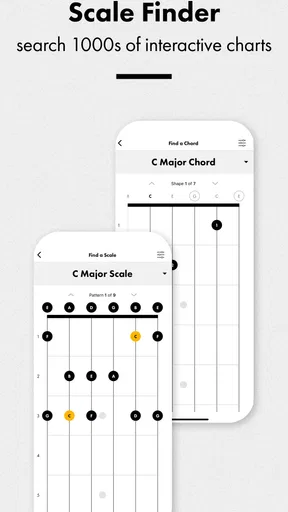
The Fender Guitar Tuner app provides a wide range of features including various tuning modes like chromatic, auto-tune, and manual tuning. It supports different instruments such as electric, acoustic, and bass guitars. Additionally, it offers a metronome and chord library, making it a comprehensive tool for both beginners and experienced musicians.
Is the Fender Guitar Tuner app free to use?
The Fender Guitar Tuner app offers a free version with basic tuning features, but it also includes in-app purchases for advanced functionalities. These may include premium tunings and additional tools. Users can choose to upgrade to access these enhanced features, but the free version is fully functional for standard tuning needs.
How accurate is the Fender Guitar Tuner app compared to physical tuners?
The Fender Guitar Tuner app is designed to be highly accurate, utilizing your device's microphone to detect pitch with precision. While many users find it comparable to physical tuners, environmental factors like background noise can affect its performance. For best results, use the app in a quiet setting and consider device calibration if needed.
Can the Fender Guitar Tuner app be used offline?
Yes, the Fender Guitar Tuner app can be used offline for tuning purposes. However, some advanced features and updates may require an internet connection. For those who often find themselves without connectivity, the core tuning functionality remains accessible, making it a reliable tool for on-the-go musicians.
Is the Fender Guitar Tuner app suitable for beginners?
Absolutely, the Fender Guitar Tuner app is very user-friendly and ideal for beginners. It provides clear instructions and visual aids to help users tune their instruments with ease. The inclusion of a chord library and instructional resources further supports learning, making it a great starting point for novice players.


